Discover everything Monstera has to offer, from everyday PDF tasks to advanced document workflows. With over 150 professional PDF tools, and an AI assistant, Monstera gives you the freedom to create, edit, convert, secure and manage documents, completely free and open source. Explore its features below.
Over 150 Tools
13 Tool Groups
Works Offline
See Monstera
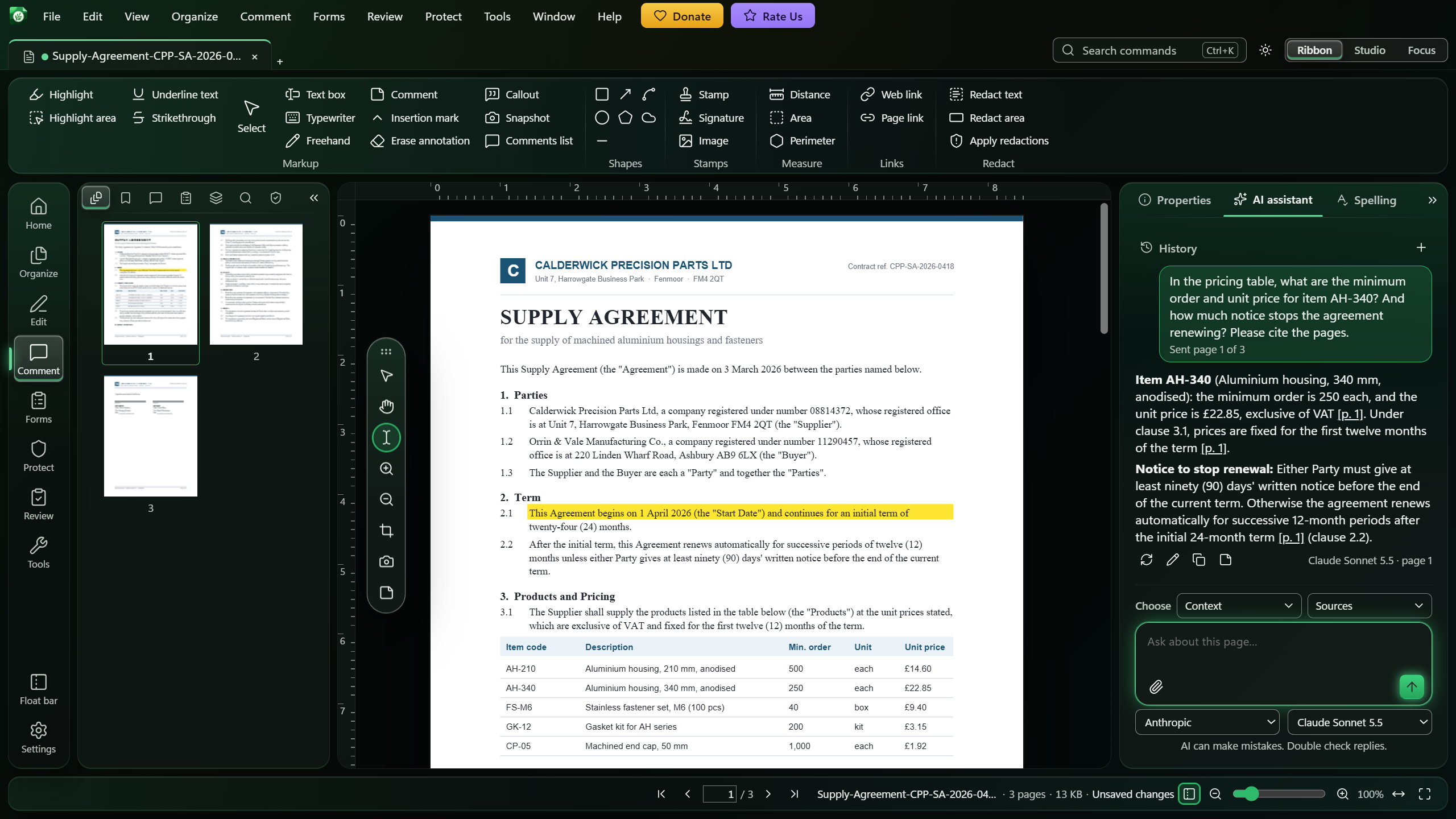
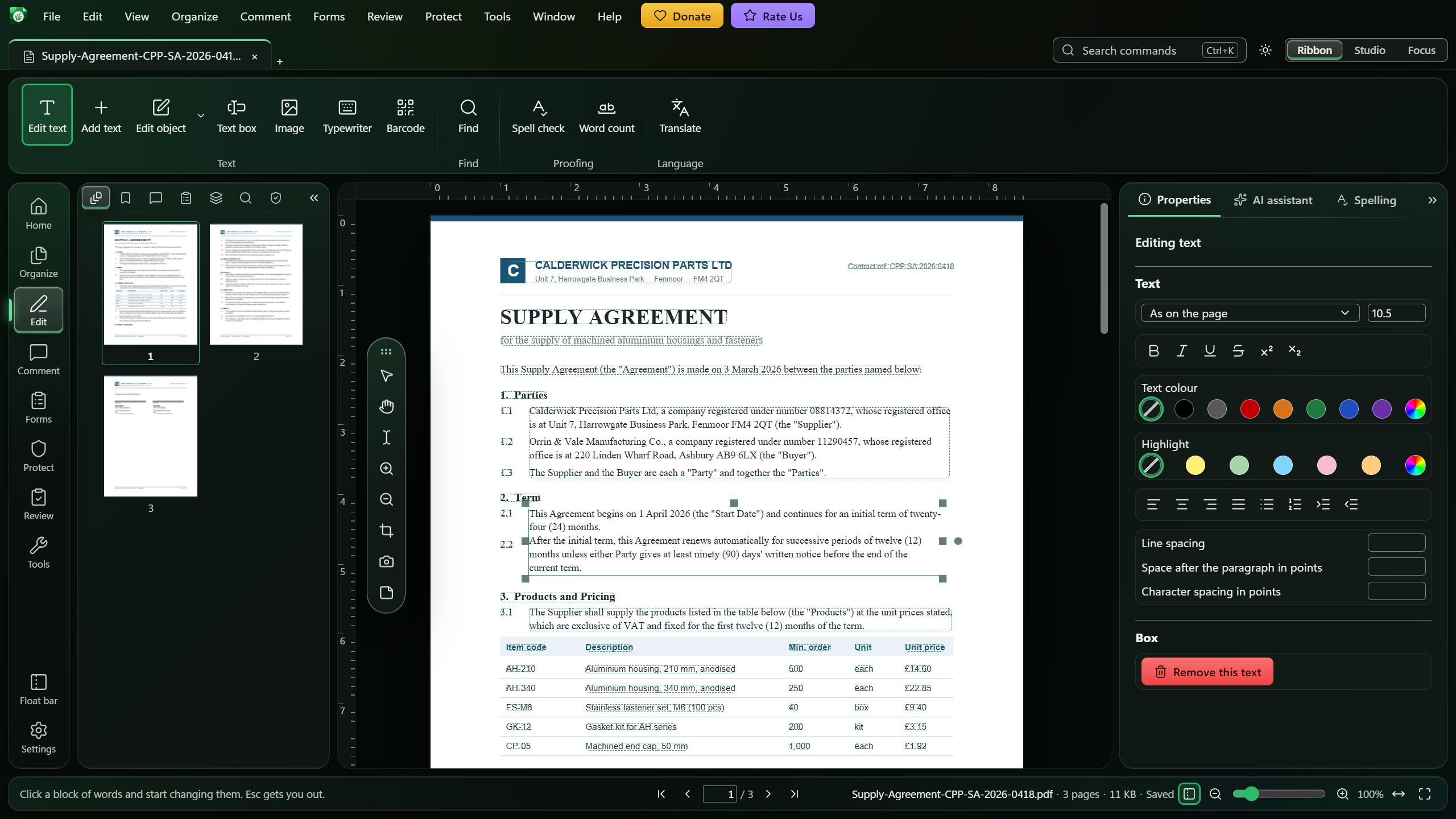
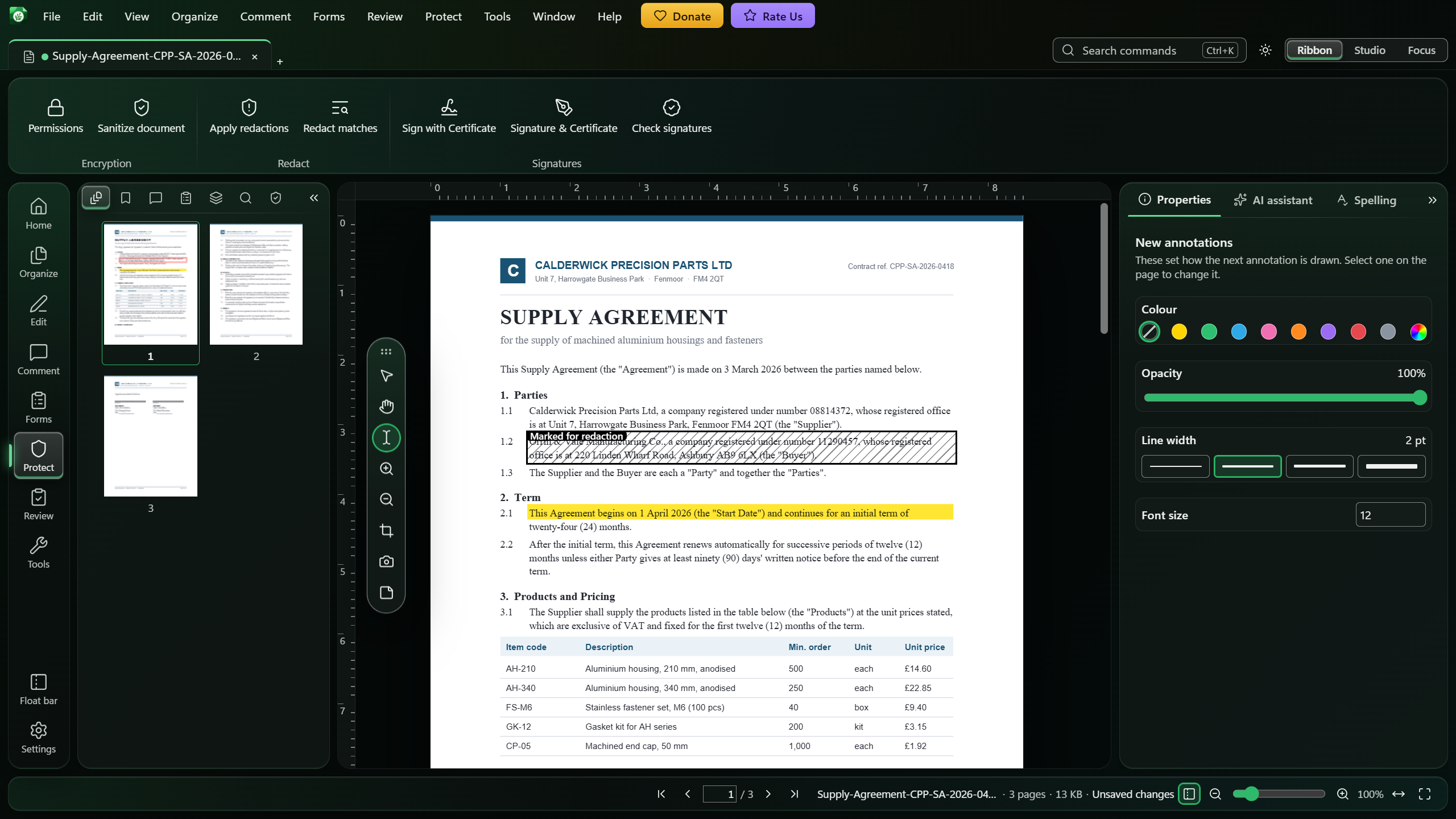
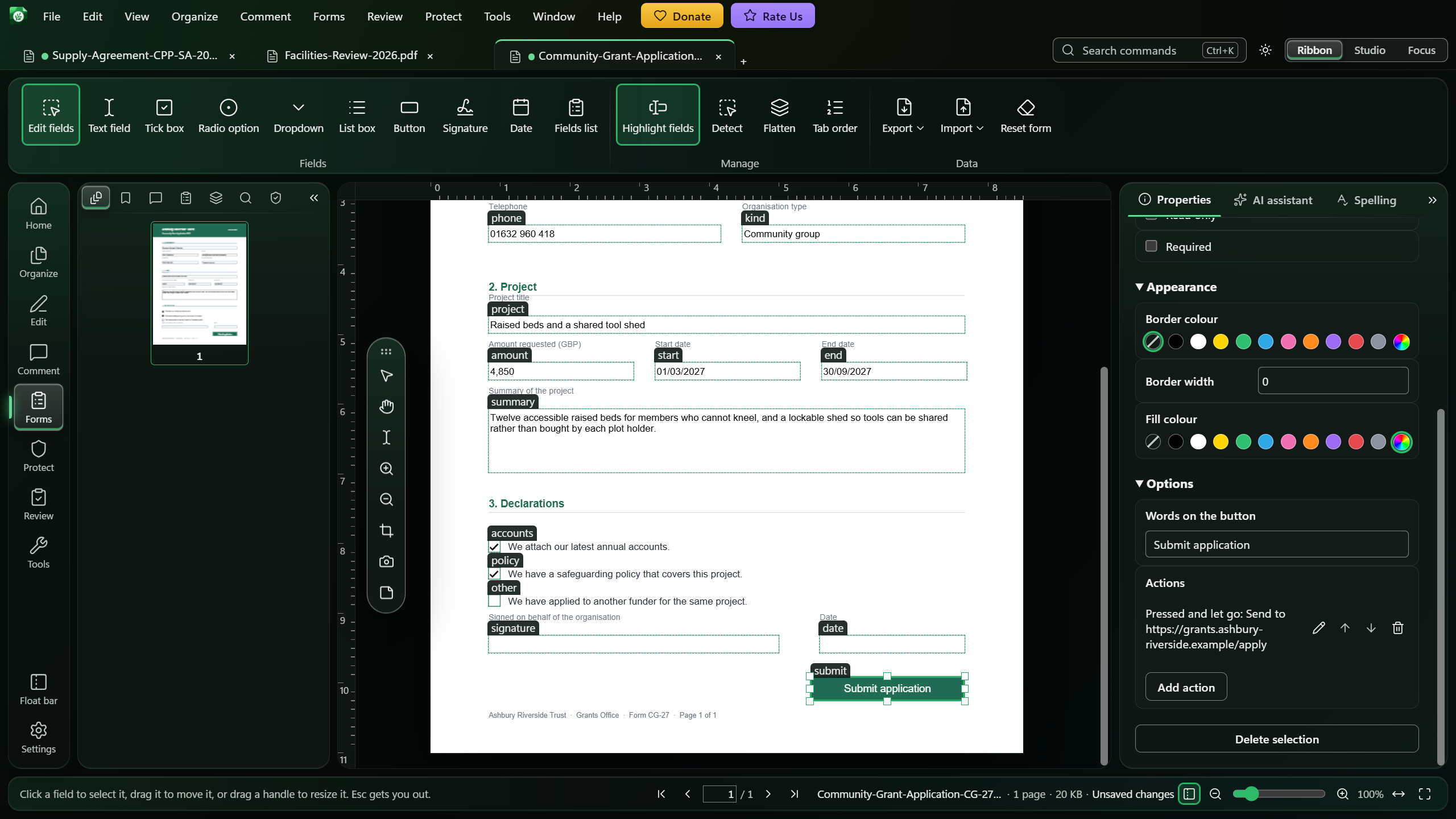
Screenshots of Monstera with sample documents.
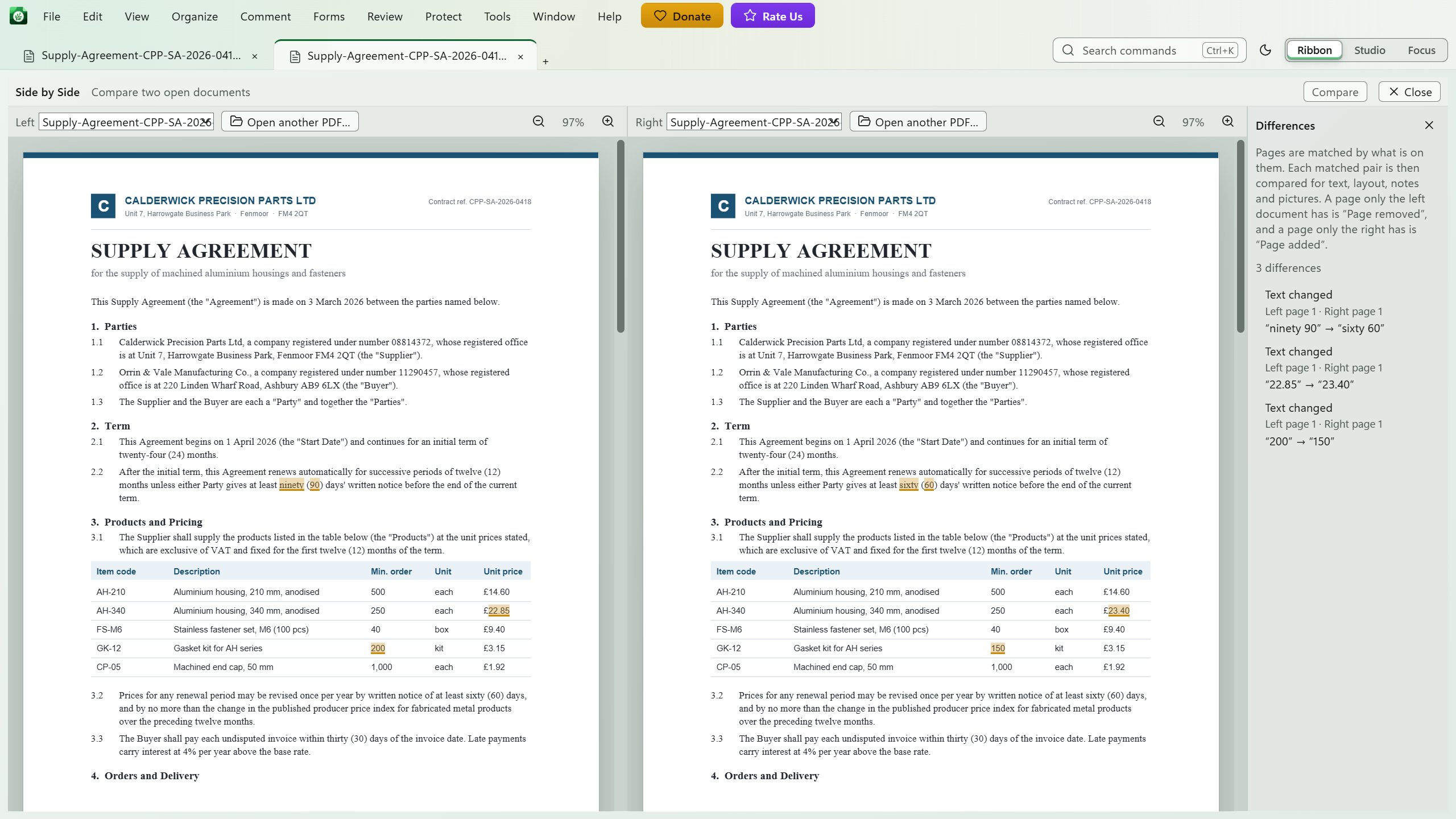
AI assistant. Monstera's AI assistant answers a question about a supply agreement with page citations, beside a highlighted clause and the page thumbnails.Edit text. Edit text opens a paragraph of a contract for editing, with its font, size, colour and spacing in the Properties panel.Redaction. A redaction marked over a company's registration details, ready to apply from the Protect ribbon.Forms. The Forms tools show every field of a grant application, with the selected Submit button's options and its submit action in the Properties panel.Compare. Compare places two drafts of an agreement side by side and marks each change, with a list of the differences.
Everything A Professional PDF Editor Should Do
Thirteen groups of tools, all included, all free.
Viewing and Navigation
Enjoy fast, smooth viewing, whether you're working with a single-page form or a scanned archive containing thousands of pages. Navigate effortlessly and keep multiple documents open in tabs.
Tabs
Thumbnails
Search
Light and dark mode
Dim pages
Split view
Side by side view
Loupe
Ribbon, Studio and Focus layouts
Autosave
Crash recovery
Open from a web address
Page Management
Organize and restructure your PDFs with ease, from rotating and rearranging individual pages to combining multiple documents into one, all within the same workspace.
Merge
Split
Insert and delete
Rotate
Extract
Crop
Resize
Duplicate
Swap
Replace
Find duplicate pages
Page numbers
Headers and footers
Bates numbering
Watermarks
Annotations and Markup
Highlight, annotate, and mark up your PDFs just as you would on paper. Add notes, drawings, and comments, all neatly organized for easy review.
Highlight text
Underline and strikeout
Sticky notes
Freehand
Link tools
Shapes and arrows
Callouts
Measure distance and area
Snapshot
Import and export comments
Text Editing
Edit existing text directly in your PDFs while preserving the original formatting wherever possible. Monstera intelligently matches fonts and uses the closest available alternative when needed.
Edit existing text
Add text
Text boxes
Typewriter
Find and replace
Links
Spell check
Word count
Forms
Fill out existing PDF forms or create your own with interactive fields. Customize field properties, control navigation order, and make your forms easy for anyone to complete.
Fill forms
Build form fields
Set tab order
Detect form fields
Flatten form
Import and export form data
Reading Scans and Handwriting
Turn scanned documents and handwritten content into searchable, selectable text with OCR support for 14 languages. Monstera detects scanned pages automatically and processes them locally, keeping your documents on your computer.
OCR in 14 languages
Automatic scanned-page detection
Deskew
Enhance scans
Straighten photographed pages
Create a PDF from camera
Handwriting to Excel and Word
Security and Signatures
Protect sensitive documents with advanced security features, including permanent redaction, password protection, and digital signatures. Remove confidential information completely, including hidden data and metadata, and securely sign, certify, and verify your PDFs.
True redaction
Find and redact by search
Sanitize documents
Passwords and permissions
Digital signing
Certify documents
Signature creation
Sign password-protected documents
Trusted timestamps
Signature verification
DocuSign signing
Review
Compare different versions of a document to quickly identify changes and review revisions. View documents side by side, examine differences, and review comments before approving or sharing.
Compare two documents
Side by side view
Comment review
Import and Create
Create PDFs from blank pages, images, Markdown, CSV files, or Microsoft Office documents. Import files from Google Drive or OneDrive, with offline Office conversion powered by ONLYOFFICE running in an isolated sandbox for added security.
Blank documents
From images
From Word, Excel and PowerPoint
From Markdown
Insert from Markdown
Tables from CSV
From your camera
Google Drive and OneDrive
Export and Convert
Convert PDFs to Word, Excel, PowerPoint, images, and other formats while preserving content and layout wherever possible. Optimize file sizes, create archival-quality PDFs, and choose the export settings that best suit your needs.
Export to Word, Excel and PowerPoint
Export to images
Layout-preserving text
Create and read QR codes and barcodes
PDF/A in three levels
Reduce PDF size
AI Assistant
Work smarter with an AI assistant built directly into Monstera. Ask questions, summarize and analyze documents, extract information, translate content, and draft text. Get answers with clickable page references, extend your research with web search, and choose from ten AI providers using your own API key.
Ask questions about a document
Bring Your Own Key
Translate with AI
Explain or summarise document
Draft a reply to a comment
Extract information
Save Chats
Built-in Help
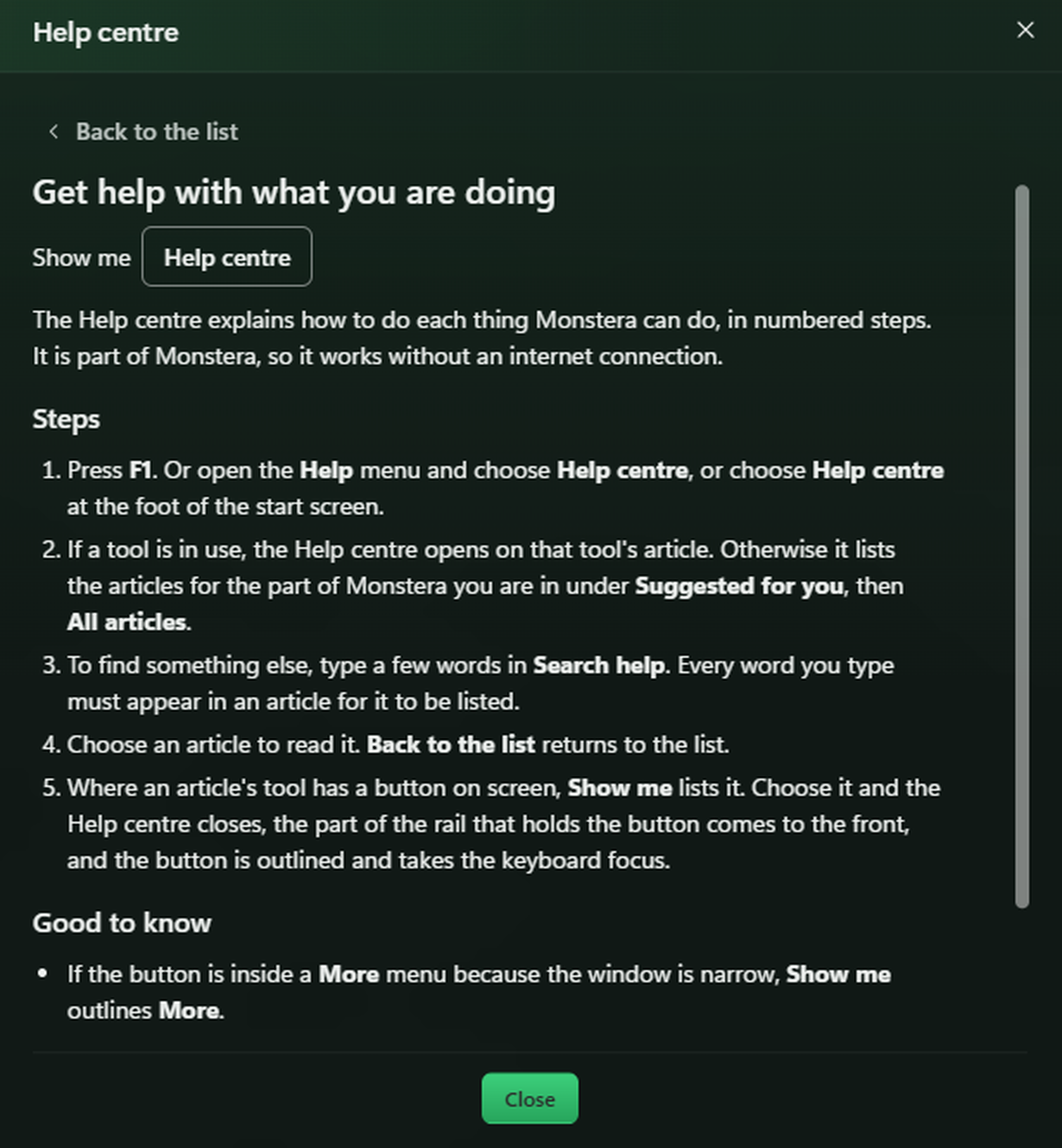
Get the guidance you need without interrupting your workflow. Press F1 anywhere in Monstera to open the relevant help article, with clear, step-by-step instructions and direct links to tools. All 143 help articles are available offline, so assistance is always within reach. The same articles are in the online Help.
144 offline articles
F1 opens the article for where you are
Step by step guides
Works offline
Accessibility
Monstera is designed to WCAG 2.1 AA and checked by automated accessibility tests on every change. Enjoy full keyboard navigation, accessible display options, and tools that make working with PDFs easier for everyone. Learn more in our accessibility statement.
Designed to WCAG 2.1 AA, checked by automated tests
Light, dark and high-contrast theme
A Reduce motion setting
Full keyboard use
AI Assistant
Talk To Your Documents
Turn your documents into an interactive source of information with Monstera's built-in AI assistant. Ask questions, summarize lengthy reports, analyze content, extract key information, and draft or rewrite text without leaving the editor. Explore topics further with integrated web search, and trace AI-generated answers back to their source pages for easy verification.
Choose from 10 leading AI providers, including OpenAI, Anthropic, Google Gemini, DeepSeek and more. Simply connect your preferred provider using your own API key (BYOK). Your requests go directly to your chosen provider, and your API keys remain securely encrypted on your computer. AI is entirely optional, and every other Monstera feature works without it.
Secure API Key Storage
Your keys are encrypted using Windows DPAPI and stored separately from application settings.
Keys Stay Private
API keys remain hidden after entry. Replace or remove them anytime without exposing their contents.
Encryption Required
If secure encryption is unavailable, Monstera refuses to store your keys in plaintext.
Direct Provider Connection
AI requests go directly to your chosen provider, with no intermediary. See what data is shared in the connection table.
Text Editing
Edit PDF Text with Precision
Edit existing text directly in your PDF without recreating the document or disrupting its original layout. Simply click on a line to correct mistakes, update information, or rewrite content. Monstera intelligently modifies only the characters you change while preserving the surrounding text and formatting. It retains the original font wherever that font supports the new characters, automatically selecting the closest standard alternative when necessary.
You can also find and replace words or phrases throughout the document, making even extensive text revisions simple and efficient.
Edit Text
Edit words or entire lines while keeping the surrounding text intact.
Preserve Original Fonts
Keep the original font or use the closest match when needed.
Find and replace
Find and replace words or phrases across your entire document.
Modify Page Objects
Move, resize, recolour, or remove objects and images.
Redaction
Redaction That Removes, Not Just Conceals
Unlike tools that simply cover sensitive text with a black rectangle, Monstera permanently removes the underlying content from the PDF. Automated tests verify that redacted text cannot be extracted again.
Redaction goes beyond visible text, removing associated hidden data. For added confidence, always review your redacted document before sharing.
Removed, Not Covered
Permanently deletes redacted content instead of simply hiding it behind a black box.
Remove Hidden Information
Clear associated form values, comments, thumbnails, and metadata.
Search and Redact
Find and permanently redact matching text throughout your document.
Sanitize Before Sharing
Remove scripts, attachments, and potentially unsafe actions from your PDFs.
Conversion
Convert Documents to PDF
Convert Word, Excel and PowerPoint files into high-quality PDFs directly on your computer, completely offline. Monstera supports both older and modern Office formats, including documents containing Chinese, Japanese and Korean text.
Need a different format? Convert PDFs into editable Word documents, export content to Excel or PowerPoint, or turn pages into high-resolution images. Monstera also supports PDF/A for long-term archiving and PDF compression, with a before-and-after size comparison so you can see the savings before saving your file.
Office files to PDF
Convert Word, Excel and PowerPoint files into PDFs, entirely offline.
PDF to Word
Choose from three conversion modes: editable text, page layout or text only.
Excel, PowerPoint & images
Export to Excel, PowerPoint, PNG, JPEG or WebP with adjustable image resolution.
PDF/A & Compression
Create PDF/A-1b, 2b or 3b archives, or reduce file size with a savings preview.
Scans & Handwriting
Turn Scans & Handwriting into Editable Documents
Transform scanned documents into searchable, selectable PDFs with Monstera's built-in OCR. Supporting 14 languages, Monstera automatically detects image-only pages and extracts text you can search, select and copy. Standard OCR runs entirely offline, keeping your documents private and on your computer.
For handwritten content, Monstera integrates with Azure Document Intelligence and Anthropic to convert notes, forms and records into editable Word or Excel files. Review and correct recognized text before exporting to Excel for greater accuracy. Only the selected page or region is sent to your chosen provider, never the entire PDF.
Private, Offline OCR
Turn scanned pages into searchable PDFs without internet access or file uploads.
14 Languages Supported
Recognize printed text in 14 languages, including English, Arabic, Chinese, Japanese and Korean.
Enhance & Capture Scans
Straighten pages, improve scan quality and create PDFs using your camera.
Handwriting to Word & Excel
Convert handwritten content into editable files with AI-powered recognition.
Signatures
Sign Documents Easily
Sign documents your way with Monstera. Draw your signature, choose from 15 professionally styled text signatures, or upload your own and place it anywhere on the page. For documents requiring stronger verification, use your digital certificate to securely sign or certify PDFs, including password-protected documents.
Go further with trusted timestamps that independently verify when a document was signed. Monstera also lets you validate existing digital signatures, save your signature for future use, and preserve signatures when saving signed documents. Whether you need a simple visible signature or certificate-based authentication, Monstera gives you the tools to handle both.
Certificate-Based Signing
Digitally sign and certify PDFs using your own certificate, including protected documents.
Sign Without a Certificate
Draw, type in 15 signature styles, or upload your own signature.
Trusted Timestamps
Verify signing times through trusted authorities without uploading your document.
Verify & Preserve Signatures
Validate digital signatures, reuse your own, and save without breaking existing signatures.
Security Architecture
Every PDF is Untrusted. Monstera Treats It That Way.
PDFs can contain hidden scripts, automatic actions and potentially harmful content. Monstera treats every document as untrusted, processing it inside a secure Windows sandbox that isolates it from your personal files, system account and the rest of Windows.
Embedded JavaScript and automatic PDF actions are never executed.
Ghostscript, Poppler and ONLYOFFICE run in isolated processes.
Markdown, CSV and image imports are processed separately.
Web-address imports cannot access your local network.
Document parsers have no network access and enforce resource limits.
Sandbox Model
Windows AppContainerDocuments are processed in a restricted sandbox, isolated from your files and Windows environment.
Enforced
Restricted File AccessThe parser can access only the document you open, not other files on your computer.
Enforced
Network IsolationDocument parsers have no network access, preventing unauthorized connections.
Enforced
Active Content BlockedEmbedded scripts, launch actions and automatic data requests are never executed.
Enforced
Help centre
Help for exactly what you are doing
Press F1 anywhere in Monstera and the Help centre opens on the article for the tool you are using. 144 articles explain how to do each thing Monstera can do, in numbered steps.
The Help centre is part of Monstera, so it works without an internet connection. Search with a few words, browse the articles suggested for the part of Monstera you are in, or let Show me point at the tool on screen. The same articles are in the online Help.
F1 opens the article for the tool in use.
"Show me" outlines the button and gives it the keyboard focus.
Works offline, with no account.
Built On Proven Open Source Technology
Monstera brings together proven open source engines for document processing, rendering, OCR, and conversion in a single Windows application. Each task is handled by the engine best suited for it. Click the dropdown to see details.
Technology details
MuPDFThe document engine: redaction, encryption, optimisation and print rendering
PDFiumIn-place text editing and a second page renderer, the engine used in Chrome
PDF.jsFast on screen display and text selection
pdf-libPage operations and annotations, a maintained fork
TesseractOCR, on a small WebAssembly core
GhostscriptPDF/A archiving
PopplerLayout-preserving text
ONLYOFFICE converterTurning Word, Excel and PowerPoint files into PDF