
How to Fill In and Create PDF Forms
To fill a PDF form, open it in Monstera PDF Editor, click a field and type, then save. To make a form, choose Forms and add text fields, tick boxes, dropdowns, date and signature fields, or let Detect find the blanks on a flat form for you. It is free, runs on your PC, and adds no watermark.
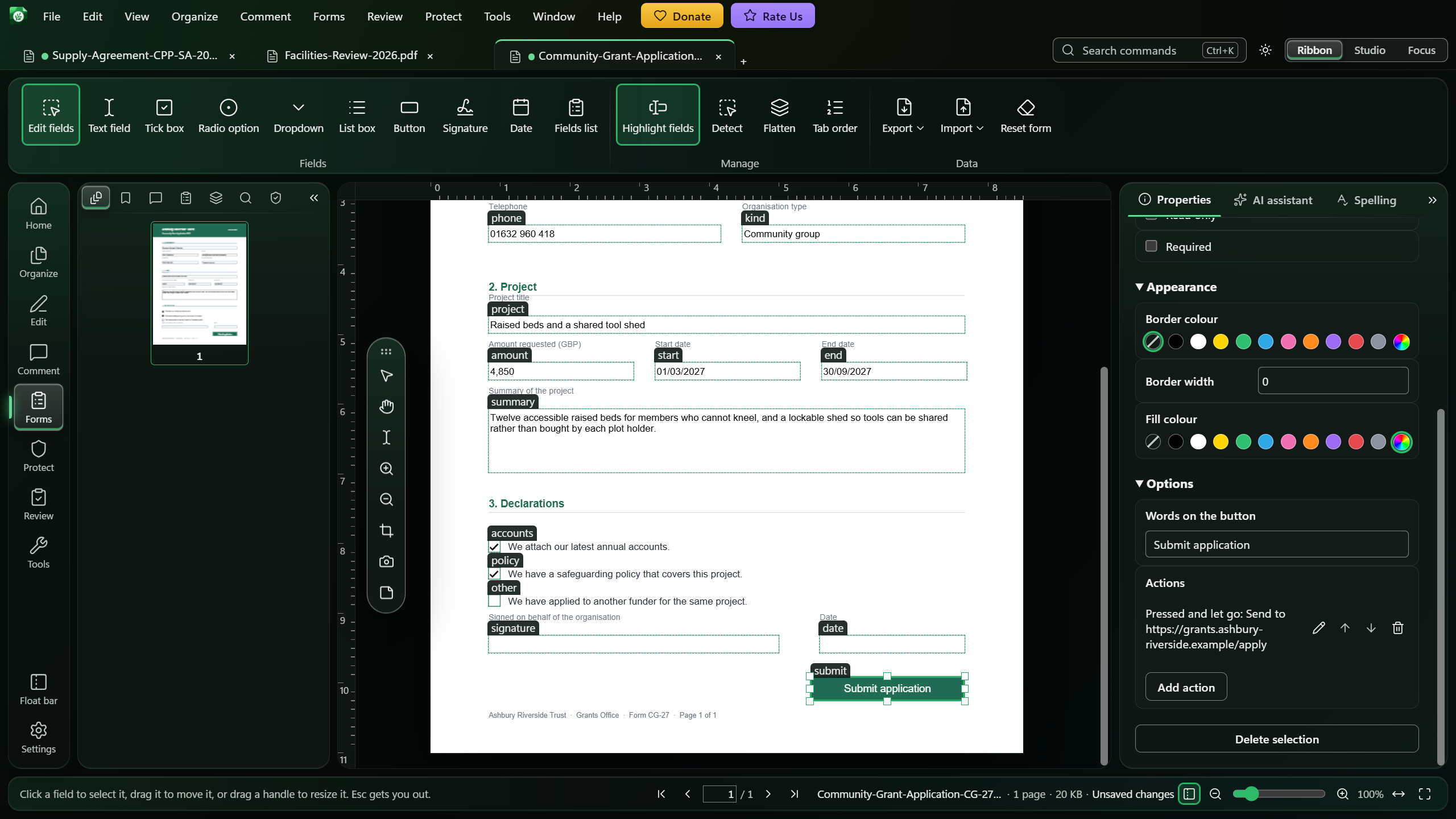
Fillable form or flat form?
A fillable form has real fields: click a box and you can type in it. A flat form is only printed lines and boxes, often a scanned or exported document. Monstera fills the first kind directly, and can turn the second kind into the first.
How to fill in a PDF form in Monstera
Open the form
Install Monstera free from the Microsoft Store and open the PDF form.
Fill the fields on the page
Click a text field and type, then press Enter or click elsewhere. Click tick boxes and options to choose them, and click a dropdown or list to pick from it.
Or work from the list
Open the Forms tab in the document panel to see every field with its kind and page, and fill it in from there. Go to page shows a field on the page.
Save
Save the document to keep what you entered.
Create your own form fields
In the rail, choose Forms, then pick a field in the Fields group: Text field, Tick box, Radio option, Dropdown, List box, Button, Signature or Date. Click the page to add it at its usual size, or drag a box to size it yourself. Double-click a tool to add several in a row, and press Esc to stop.
Each field is named for you. Rename it, change a dropdown's choices or a date's format in the Properties tab.
Turn a flat form into a fillable one
Go to the page and choose Forms, then Detect. Monstera looks for empty ruled lines, boxes, small squares and small circles with words next to them, marks each one, and lists them. Untick anything that is not a place to write, choose Find on all pages if you like, then Add fields. Lines and wide boxes become text fields, small squares tick boxes, and small circles radio buttons. One Ctrl+Z takes them all back.
Good to know
- Dates have a calendar. Choose the button at the right edge of a date field, or press Alt+Down; you can always type the date instead.
- Scripts never run. Monstera does not run scripts from documents, to keep your computer safe. A field worked out by a script is marked with { } and does not update by itself; standard sums and formats still work.
- Start again with Forms, then Reset form. Every field goes back to how the form started, and signatures stay.
- Finished? Flatten the form so the answers can no longer be changed, or export the form data.
Questions
Can I fill in a PDF form for free?
Yes. Monstera fills text fields, tick boxes, options, dropdowns, lists and dates for free, with no watermark and no account.
Can I make a non-fillable PDF fillable?
Yes. Forms, then Detect finds the empty lines, boxes and circles on a flat form and turns the ones you keep into real fields. You can also add fields by hand.
What kinds of form fields can I create?
Text fields, tick boxes, radio options, dropdowns, list boxes, buttons, signature fields and date fields.
Why does a calculated field not update?
Monstera never runs scripts from documents, to keep your computer safe, so a field worked out by a script is marked with { } and does not update by itself. Standard sums and formats still work.
Full instructions in the Help
Related guides
How to Sign a PDF with a Digital Certificate
Sign with your .p12 or .pfx certificate, with or without a signature on the page.
How to Edit Text in a PDF for Free on Windows
Change the words already on a page, in place, in the page's own font.
How to Convert PDF Tables to Excel
Pull the tables out of a PDF, correct any cell, and save them as a workbook.
Get Monstera Free for Windows
Over 150 PDF tools, free and open source, with no subscription, no account and no watermark.